A big fast table for your photos
Drop a whole shoot on it, push the pictures around, make piles, keep the good ones. Built by a photographer, for himself.
tl;dr
What this actually is
mess is a big table on your Mac. Drop photos on it and move them around. Pan, zoom, spread them out, and make piles: the thing grids don't do. Everything stays where you left it.
Sort with two keys: pick or reject. Rejects fade, nothing is deleted. Open a photo full screen, compare two side by side, write a note. Make as many tables as you want: cull a shoot, curate a portfolio, pick what gets printed for the family album, mock up a post.
Plain files on your Mac. No account, no server, no subscription.
Extras on top of the table
- Create and export Instagram-ready carousels
- Crop and rotate photos, without touching the originals
- Put a border around a photo, in colours picked from the photo itself
- Line photos up with exact gaps, or spread them evenly
- Sticky notes
- Import HEIC straight from the iPhone, and video clips
- Export the whole table as one image, or your picks as the original files, web-sized or with your watermark
- Archive finished tables to get the disk space back
- Demo mode: the camera hops photo to photo on its own, full screen, for showing a table to someone
- Press I on any photo for its camera, lens and exposure, read from the file itself
Built around one job
Moving a photo over a pile of hundreds must never stutter. That is where the engineering went. The rest is a short list of tools that sit on the table.
Push one photo across the whole pile
It moves like paper on a desk, not like a website. The app is a few megabytes, and it stays snappy however big the pile grows. Fling the view, dive into a frame, pull back out. Nothing stutters.
Sort at the speed of doubt
X out, P pick, U not sure, next photo. Picks glow, rejects fade to a whisper but stay on the table, because sorting is not deleting. Change your mind whenever.
Frames are windows, not boxes
Lay Instagram-ratio frames over the pile and slide photos underneath until each crop reads right. ⌘E ships every slide as a numbered 1080px PNG, drawn from the originals.
You work on copies
Importing copies each photo into the vault; the table shows previews of it. Crop it, frame it, reject it: the original is never touched, and exports hand it back byte for byte.
Plain files on your own disk
Tables are readable JSON, photos are ordinary files, everything lives in ~/Documents. No account, no cloud, nothing that stops working when a company does.
Real tables
Straight out of the working vault. No staging, no sample content.
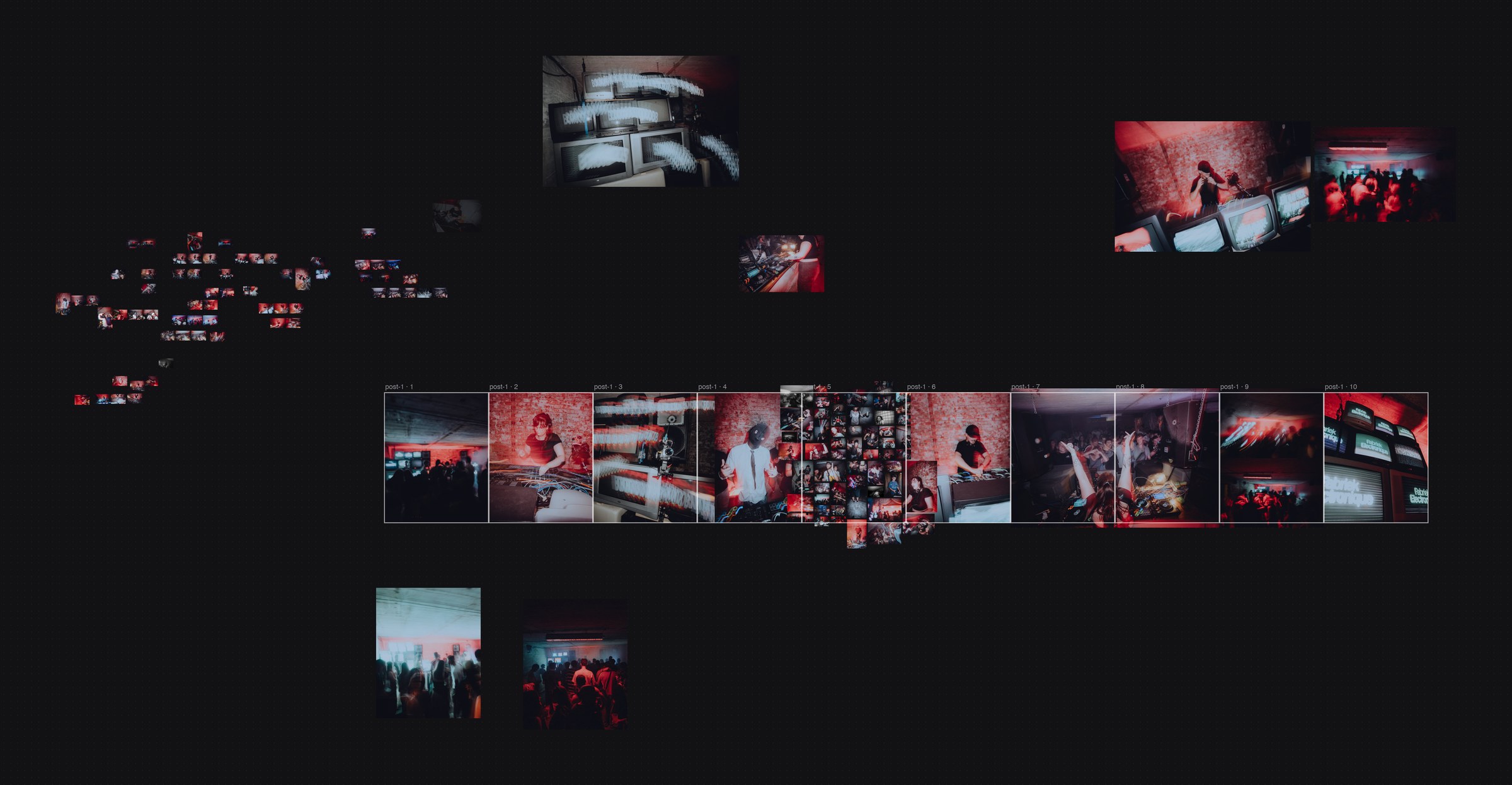
One table, whole story
A club night start to finish: the raw pile sorted and dimmed at the left, contenders enlarged for a closer look, and the ten-slide carousel taking shape through the middle. Nothing left the table; it just found its place.
Zoom out to think, dive in to look
A studio shoot mid-sort: 128 photos, 113 already faded out, the piled picks at the bottom. Press Z and the camera flies to the selection; press it again and you are back over the whole table.
A finished carousel, exactly as it exports
Ten fixed-ratio slides composed over the pile. The contact sheet is still visible behind slide five, because the mess stays until you are done with it.

Gather here
Right-click an empty spot and the scattered picks fly into a tidy pile, still selected, ready to drag onward. One undo puts them back where they were.
Demo mode
Press D and the interface steps aside: the camera hops from photo to photo on its own, lifting off as it travels and diving back down. For showing a table to someone without touching anything.
Keyboard first
Press ? in the app for the same sheet. The full map is on the features page.
Navigate
Sorting
Create & arrange
Tables & files
Put your next shoot on the table
Drop the exports on it and sort the way your hands already know how. No account, no cloud, no subscription: it is just a fast app on your own Mac, built by one photographer for his own shoots. If you want the occasional note on what changed, leave an address: no spam, unsubscribe whenever.